What this covers
- See a case-summary example from input to review.
- Understand the two actions and their text, structured-response and field-update patterns.
- Configure review deliberately: Record Updater can update a record directly.
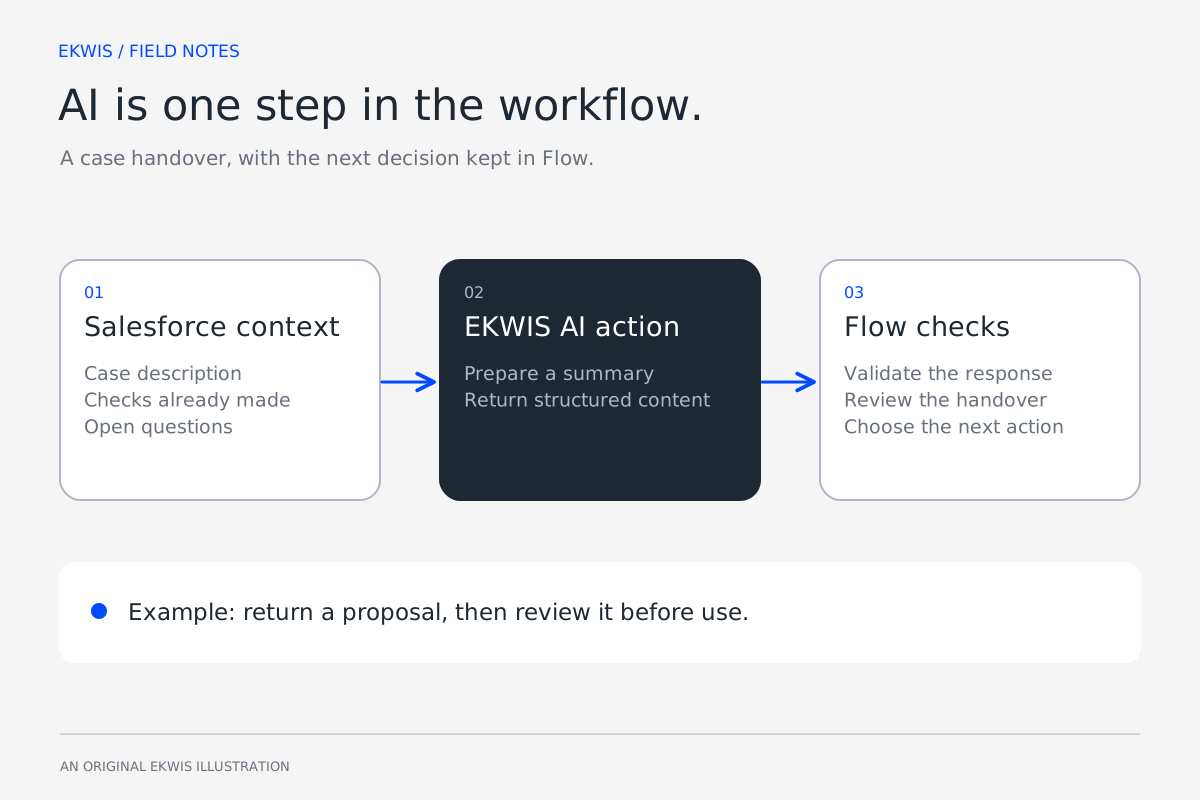
The next person taking over a case needs to know what happened, what has already been tried and what is still open. AI can help prepare that handover when the relevant context is available and someone can check the result.
EKWIS AI supplies reusable Salesforce Flow actions for this kind of work. The package handles the provider request and response; your Flow supplies the information and decides what the process does next.
Start with the handover the team needs
Use a small case example with a clear result to check. The Flow can pass selected fields and relevant notes rather than every piece of information attached to the customer.
| Input | Content |
|---|---|
| Issue | The customer cannot activate a newly added user. Existing users can still sign in. |
| Work so far | Support checked the email address and resent the invitation. The customer reports the same error. |
| Next owner needs | A short summary, the checks already made and the unresolved question. |
The instruction should describe the output and its limits: summarise the supplied facts, keep the failed checks visible and identify missing information. Do not ask the model to invent a root cause or promise a resolution time.
Return a response the Flow can use
Use Response Service when the next step needs text or structured content. For example, the output could separate a summary from the open question so the Flow can display them in a review screen.
{
  "summary": "A newly added user cannot activate their account. Existing users can sign in.",
  "checksCompleted": [
    "Email address checked",
    "Invitation resent; error remains"
  ],
  "openQuestion": "What exact error is shown during activation?"
}
This is an illustrative output shape. Validate the response before using it: required values must be present, the structure must be readable, and any categories must match the options your process allows. A valid JSON object can still contain an inaccurate statement.
Choose the action for the job
| Action | Useful for | What the implementation decides |
|---|---|---|
| Response Service | A summary, free text or structured response | How to parse, check, display and route the content |
| Record Updater: analyse only | A proposed value for a selected Salesforce field | Whether a person or a later Flow step accepts the value |
| Record Updater: update mode | Applying the determined value to the selected field | When an automatic update is suitable and which access and checks apply |
Record Updater uses Salesforce field information when determining a value. That makes a selected field and its configured options part of the task. The implementation still needs representative tests for the particular field, record type and context.
Build the review and exception paths
- Collect the approved case context and call the chosen action.
- Handle a provider error, timeout or empty result without silently treating the step as successful.
- Validate the fields and format the process needs.
- Show the proposed handover to the case owner, with the original context available.
- Apply the accepted result through the agreed Salesforce step and record any unresolved question.
| Test case | Expected behaviour |
|---|---|
| The case has no troubleshooting notes | The summary does not invent work that was done. |
| The description contradicts a later note | The review makes the uncertainty visible. |
| A required JSON value is missing | The Flow uses its exception path. |
| The provider is unavailable | The owner can continue through an agreed manual route. |
| The model suggests a field value outside the allowed options | The implementation rejects or routes the result for review. |
Keep the data path clear
EKWIS AI calls the configured provider from Salesforce using customer-owned credentials. Selected context leaves Salesforce for that provider. Decide which records and fields can be sent, who can change the configuration, and what prompt or response information is stored or logged.
Provider access and costs sit alongside the EKWIS AI product arrangement. Confirm the supported package version, provider and use-case volume during guided onboarding. The current product is offered through a private release; it is not a promise of a finished workflow for every business process.
Official references
- Named and external credentials — Salesforce Developers
- Packaging named and external credentials — Salesforce Developers